The Mac equivalent of Alt+F4 is Cmd+Q - it quits the app you're in. To close only the current window or tab and keep the app running, press Cmd+W. If the app has frozen and won't quit, press Cmd+Option+Esc.
Alt+F4 itself does nothing useful on a Mac: Alt is the Option key here, and F4 is a system key (Spotlight or Launchpad, depending on the keyboard).
Cmd+Q: quit the app
Cmd+Q closes every window of the app and quits it completely - the same as choosing Quit in the app's menu, the one with the app's name next to the Apple logo. If there are unsaved changes, the app asks first.
The one app you can't quit this way is Finder - it always runs. Cmd+W closes its windows.
One habit to unlearn early: Q sits right next to W. Meant to close a tab, quit the whole browser. Chrome has a safety net for this - Chrome menu → Warn Before Quitting.
Cmd+W: close the window, keep the app
On Windows, closing an app's last window usually exits the app. On a Mac it usually doesn't: Cmd+W, or the red button in the window's top-left corner, closes the window, and the app keeps running. You can tell by the dot under its icon in the Dock.
That's by design: the app stays ready, and clicking its Dock icon opens a new window instantly. Some single-window apps, like System Settings, do quit when you close their window.
| Windows | Mac | What it does |
|---|---|---|
| Alt+F4 | Cmd+Q | Quit the app |
| Ctrl+W | Cmd+W | Close the window or tab |
| - | Cmd+Option+W | Close all windows of the app |
| Win+↓ | Cmd+M | Minimize the window |
| - | Cmd+H | Hide the app |
| Alt+Tab | Cmd+Tab | Switch between apps |
| Ctrl+Alt+Del | Cmd+Option+Esc | Force quit a frozen app |
When an app is frozen: Force Quit
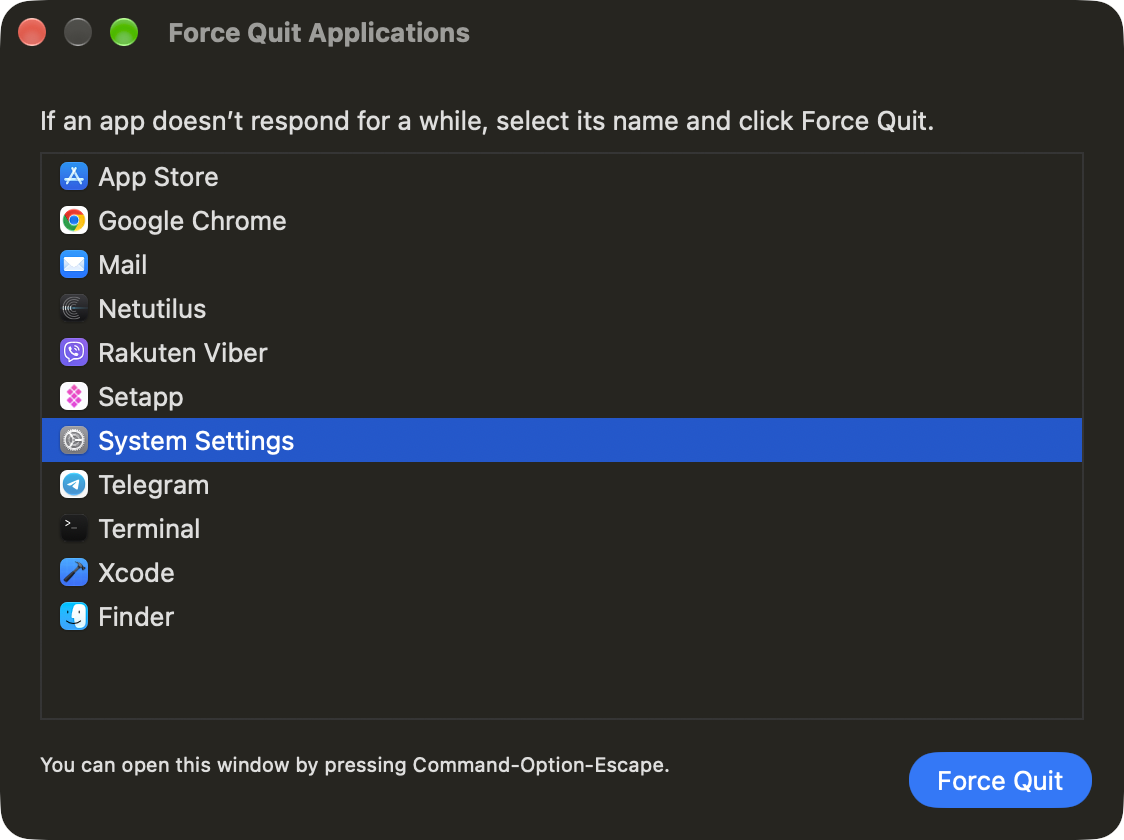
If Cmd+Q does nothing because the app has stopped responding, use Force Quit - the Mac's version of Ctrl+Alt+Del and "End task":
- Press Cmd+Option+Esc. The Force Quit Applications window opens.
- Select the app. Frozen apps are marked "Not Responding".
- Click Force Quit.
Two other ways:
- Hold Cmd+Option+Shift+Esc for about three seconds to force quit the app in front, with no window in between.
- Right-click the app's icon in the Dock while holding Option - "Quit" in the menu turns into "Force Quit".
Force quitting loses unsaved changes, so try a normal Cmd+Q first. To see everything that's running, with CPU and memory use, open Activity Monitor - the Mac's Task Manager. The fastest way is Cmd+Space, then type "Activity Monitor".
Alt+F4 on a Windows keyboard
On a PC keyboard connected to a Mac, the Windows key works as Cmd and Alt works as Option. So quitting an app is Win+Q, and closing a window is Win+W. Alt+F4 still does nothing.
If your thumb keeps reaching for the key next to the space bar, swap the modifiers: System Settings → Keyboard → Keyboard Shortcuts… → Modifier Keys, pick your keyboard and swap Option and Command. After that the key in the Alt position acts as Cmd, and Alt+Q quits the app.
Can I make Alt+F4 work on a Mac?
macOS has no setting for it. A key remapping app such as Karabiner-Elements can map Option+F4 to Cmd+Q if you really want to keep the habit. Most people find it easier to switch to Cmd+Q - it takes about a week, and it's a one-hand shortcut.
More Windows habits
Alt+F4 is one of a dozen shortcuts that change on a Mac. Home and End, Delete, screenshots and the rest are in Mac keyboard shortcuts for Windows users. If you're making the move right now, start with the guide to switching from Windows to Mac.
Alt+Shift doesn't switch the keyboard language on a Mac either - here's how to switch keyboard language on a Mac. And when text still comes out in the wrong layout, Boomkey fixes it: select it and double-tap Shift.
FAQ
What is Alt+F4 on a Mac? Cmd+Q quits the current app. Cmd+W closes only the current window or tab.
How do I close a window without quitting the app on a Mac? Press Cmd+W or click the red button in the window's top-left corner. The app keeps running until you press Cmd+Q.
Why doesn't the red button quit the app on a Mac? On a Mac, most apps keep running after their last window closes, so they open again instantly. Press Cmd+Q to quit.
What is the Mac equivalent of Ctrl+Alt+Del? Cmd+Option+Esc opens the Force Quit window, where you can close a frozen app.
How do I force quit an app on a Mac without a window? Hold Cmd+Option+Shift+Esc for about three seconds. The app in front quits immediately.
What is Alt+F4 on a Windows keyboard connected to a Mac? Win+Q. On a PC keyboard the Windows key acts as Cmd, so Win+Q quits the app and Win+W closes the window.
Type freely. Boomkey fixes it.
Fix text typed in the wrong keyboard layout on macOS 14+. 7-day free trial, no card required.
Related articles
Mac Keyboard Shortcuts for Windows Users: What Replaces What
Ctrl+C becomes Cmd+C - the easy part. The Mac equivalents of Home and End, Delete, Alt+F4, Ctrl+Alt+Del, Print Screen and Alt+Shift, in tables.
Switching from Windows to Mac: The Complete Beginner's Guide (2026)
Where the Start menu and C: drive went, how to install apps, move your files, switch keyboard language without Alt+Shift, and what to set up on day one - everything you need when switching from Windows to Mac.
How to Switch or Change Keyboard Language on Mac: All the Ways
Ctrl+Space, the Globe key or the input menu: every way to switch keyboard language on a Mac, how to add a second language first, and what to do when Ctrl+Space does nothing.